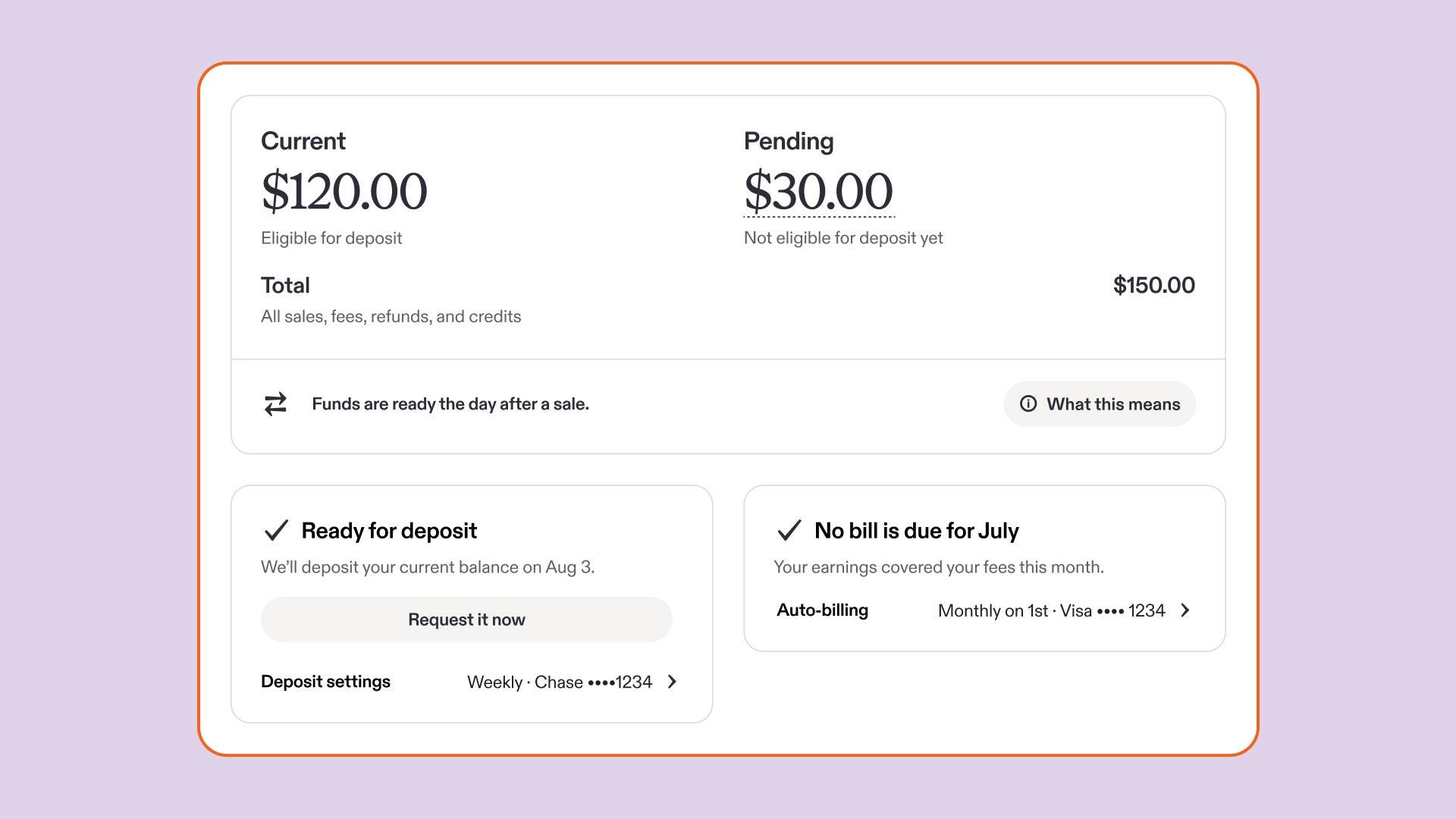
Your Payment account has a new look. Over the next few months, updates are rolling out that give you a clearer picture of your shop finances, from sale to payout. Here's what's changed and what to expect.
What's live now
A new way to read your balance
Your Payment account now shows your balance in three parts, visible directly on the page:
- Current: funds that are available now, or already applied to fees, refunds, or billing
- Pending: funds that are still processing or being held in reserve
- Total: your current and pending balances added together
The math is always visible: current + pending = total.
Your billing information is still visible, but has moved, so your balance and deposit status are easier to find first.
Ready for Deposit
A new Ready for Deposit module shows, at a glance, whether anything needs your attention before your next payout.
This module separates two things that used to be easy to confuse:
-
Payout timing: when your money will become available for deposit, like when a sale is still processing or funds are in reserve
- Deposit health: whether your account can receive a deposit
If something is blocking your deposit, the module will surface it directly and, if there’s any action you need to take, give you a way to resolve it. If multiple conditions apply, you'll see all of them at once, not one at a time. If your account is in good shape, Ready for Deposit will show you when to expect your current balance to be sent to your bank account.
Reserve: what's changed
If your shop has a Payment account reserve, the biggest change is where reserve information lives.
-
Reserve amounts are now part of pending. The standalone reserve module is gone. Any funds held in reserve are now included in your pending balance, alongside earnings still in their initial processing period. You can dive deeper to see which specific sales are in reserve by hovering over your pending balance and selecting “In reserve”.
-
Reserve details live in a side panel. To see details like when reserved funds become available for deposit, how to access sooner and when Etsy will reevaluate your reserve, select “What this means” under your balance to open the details panel.
-
The reserve minimum is retired. All reserve funds are now part of your pending balance. When they become eligible for deposit, they are added to your current balance.
- The re-evaluation date shows when Etsy will review your account status. You’ll always receive an update from us when that happens. (Find out how to avoid reserves in the future.)
A note on negative Current balances
Your current balance can now show as negative. This happens when refunds or real-time fees, like Etsy Ads or shipping labels, are higher than the earnings currently available in your current balance. It reflects your balance at that moment and will update as pending funds become current.
Fee and earnings timing
Fees from a sale, like your payments processing fee or transaction fee, will now stay pending until that sale's earnings are available. This means these fees won’t reduce your available for deposit balance until the related sale’s earnings become available. Non-sale fees (Etsy Ads, shipping labels, listing fees, subscription fees) will continue to deduct in real time.
Coming soon
The following updates are expected to roll out in the coming months.
Transaction tabs
Your transaction history will be reorganized into three tabs: total, current, and pending. These tabs will match your balance breakdown, so you can more easily trace each balance back to the transactions behind it.
Expandable transactions
Each sale in your transaction history will appear as a single line item, with associated fees and other details expandable underneath. This will make it easier to see what’s included in each order, instead of reviewing each related fee as a separate line.
 Words by Etsy Staff